
When we got a request to migrate Cypress tests to Playwright, we expected a long, tedious rewrite process.
Surprisingly, with the help of GitHub Copilot, we managed to kick off the Cypress to Playwright migration in just a couple of days — and keep our CI pipeline running the entire time without interrupting any testing processes.
In this article, I’ll share how we approached this migration, the lessons we learned along the way, and how AI assisted code migration can drastically reduce the manual overhead of framework transitions.
Project Context
The project was a complex healthcare platform with a lot going on under the hood. Our testing setup included:
- End-to-end (E2E) and integration tests
- A custom TAF architecture with setups, teardowns, and entity creation
- Multi-environment configurations
- Dynamic data and deep navigation logic
In total, we had 148 E2E tests running on Cypress — all working fine, but the organization wanted to standardize QA tooling across teams, which meant one thing: Playwright migration.
Why Use GitHub Copilot for Migration?
When the migration request came in, I saw an opportunity to experiment with GitHub Copilot test automation. Instead of manually rewriting hundreds of test files, I wanted to see how far we could push AI assistance to automate syntax conversion from Cypress to Playwright.
And honestly, it worked far better than expected.
GitHub Copilot handled most of the repetitive translation (selectors, commands, async handling, etc.), letting us focus on infrastructure adjustments and fine-tuning.
Within 1–2 days, we already had a working prototype of the Playwright test automation framework.
Two Key Disclaimers
Always Verify AI-Generated Code
Even though AI assisted code migration speeds things up, you must review every line. Infrastructure migrations can easily introduce subtle bugs or performance regressions. Think of Copilot as your pair programmer, not an autopilot.
Keep the Old Framework Running Until the End
Never block releases or regressions during migration. Keep your Cypress tests running on CI until the corresponding suites are fully stable in Playwright. Once a suite is migrated and validated, remove it from Cypress and switch CI to run it in Playwright.
This gradual rollout ensures zero downtime and continuous testing coverage throughout the process.
Workflow to Migrate from Cypress to Playwright
Once the groundwork was clear, we moved into the hands-on migration.
Below is the workflow that helped us run both frameworks in parallel, maintain CI stability, and start migrating tests incrementally — without blocking ongoing releases.
1. Initialize Playwright and Create the Folder Structure
The first step was to initialize Playwright and create a clean, isolated folder structure. We wanted both frameworks to live side by side in the same repository, so we could execute them simultaneously during the transition.
That setup allowed us to:
- Migrate gradually
- Compare results and timings between Cypress and Playwright
- Keep CI pipelines running for both
Initialization example:
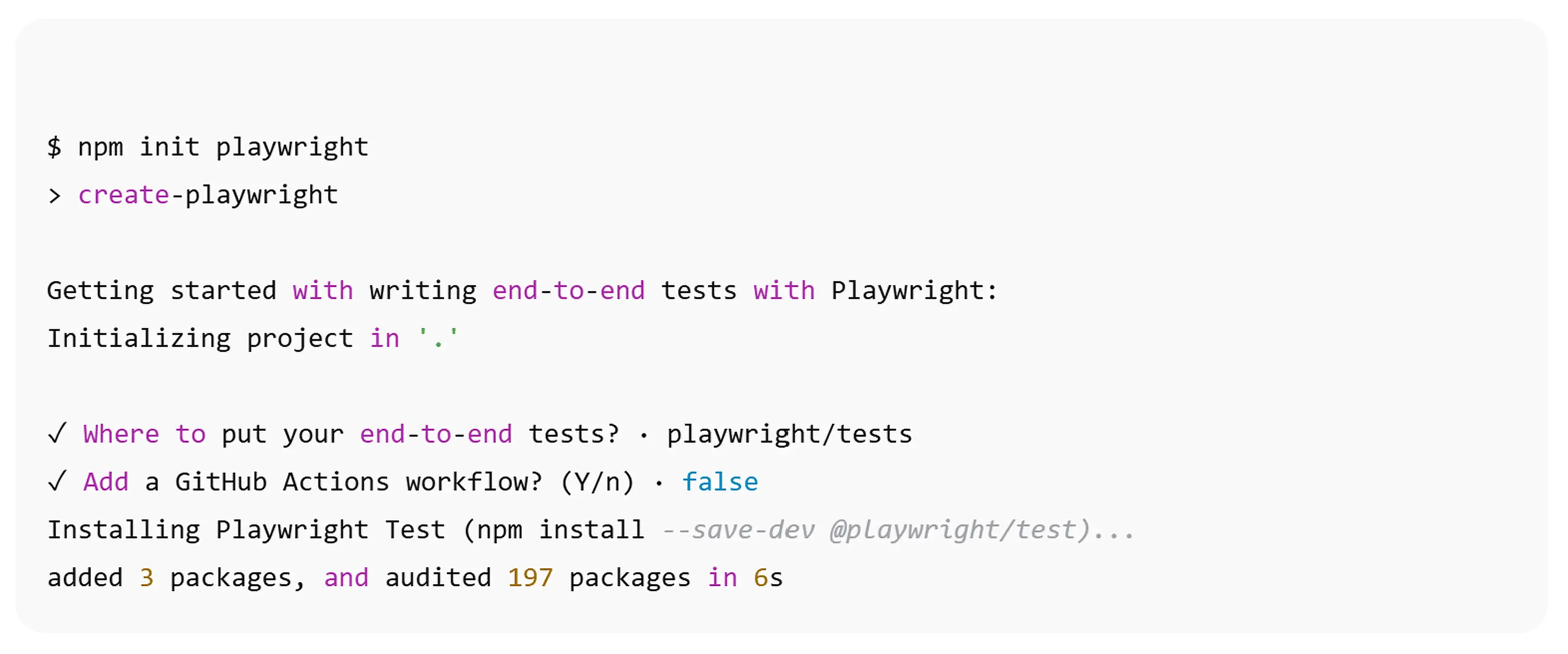
Here’s the proposed folder structure we used for Playwright:
├── cypress/
│   ├── app/
│   ├── downloads/
│   ├── e2e/
│   ├── fixtures/
│   ├── screenshots/
│   ├── support/
│   └── videos/
├── playwright/
│ 	├── app/
│	│   ├── components/
│	│   ├── fixtures/
│	│   └── pageobjects/
│   ├── constants/
│   ├── helpers/
│   ├── reports/
│   ├── test-results/
│   └── tests/
├── .gitignore
├── package.json
├── playwright.config.ts
├── smoke.config.ts
├── tsconfig.json
2. Configure Separate tsconfig Files for Each Framework
One of the early issues we faced was TypeScript conflicts — both frameworks define similar method names (expect, request, etc.), and sharing a single tsconfig.json led to compilation errors.
The solution was simple: split the TypeScript configs. This structure ensures that each framework initializes its own type definitions and avoids type collisions:
├── tsconfig.json
├── tsconfig.cypress.json
├── tsconfig.playwright.json
Main tsconfig.json
Add the composite option to support project references.
tsconfig.json
{
  "compilerOptions": {
    "composite": true
  }
}
tsconfig.cypress.json
{
"extends": "./tsconfig.json",
"compilerOptions": {
"types": ["cypress", "@testing-library/cypress", "node"],
"isolatedModules": false
},
"include": ["cypress/**/*.ts"]
}tsconfig.playwright.json
{
"extends": "./tsconfig.json",
"compilerOptions": {
"types": ["node", "@playwright/test"]
},
"include": ["playwright/**/*.ts", "playwright.config.ts"]
}With this separation in place, both frameworks could coexist peacefully in one repo — no more compiler conflicts, and no risk of accidentally initializing shared methods twice.
3. Create a Prompt to Automate Migration with GitHub Copilot
Once Playwright was initialized and the project was structured, it was time to let GitHub Copilot help with the heavy lifting.
To do this, we created a custom prompt that defines how Copilot should behave when rewriting tests from Cypress to Playwright. The prompt tells the agent what to do, how to do it, and what to ignore — giving consistent results across all migrations.
How to Add the Prompt
Inside your GitHub repository, open the Gear icon ⚙️ in Copilot Chat and create a new prompt.
The file will be saved automatically under: ./github/prompts/
You can name it something like migrate_tests.md.
Prompt example:
---
mode: agent
---
You are a Playwright Test Generator, an expert in browser automation and end-to-end testing.
Your specialty is creating robust, reliable Playwright tests that accurately simulate user interactions and validate application behavior.
Your task is to help migrate existing Cypress tests to Playwright tests.
The Cypress tests, page object, components, and helper files are provided as input, and you need to generate equivalent Playwright test code.
Output ALL migrated code to the chat.
When generating the Playwright test code or any page objects, ensure that:
1. The test structure follows the same structure as the Cypress tests.
2. Create a global fixture for setup and teardown and reuse it in the tests.
3. All user interactions (clicks, typing, navigation) are accurately translated to Playwright syntax in page objects and test files.
4. Assertions in Cypress are converted to equivalent Playwright assertions.
5. Ignore the network spying and stubbing parts of the Cypress tests.
6. Comment out all the methods with waits (e.g., cy.wait) in the Playwright code.
7. Do not use get methods in page objects; use direct methods instead `backbackItem = () => this.page.locator('[id="item_4_title_link"]');`
Why This Helps
This kind of structured prompt allows GitHub Copilot to behave more like a specialized migration assistant, not a general-purpose code generator.
With the right context and rules, Copilot can automatically:
- Rewrite large chunks of Cypress tests into Playwright syntax
- Maintain folder and test structure consistency
- Reduce manual conversion time by 70–80%
Essentially, you’re creating your own AI migration toolchain — tailored to your project’s structure and conventions.
4. Select Agent Mode and Run the Migration Step-by-Step
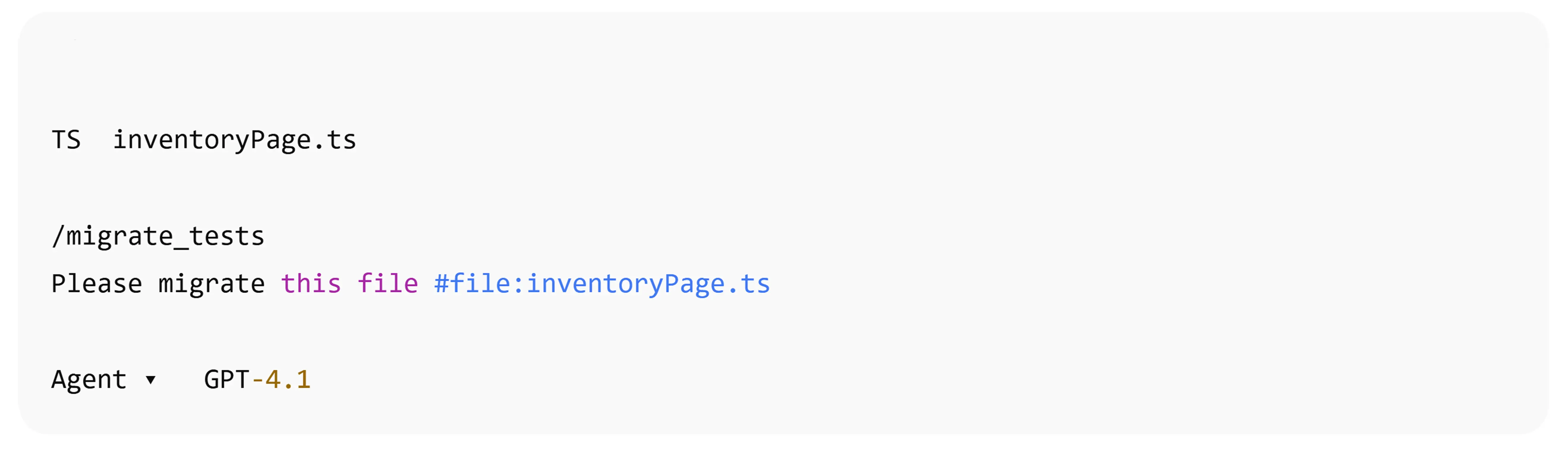
Once the prompt was ready, the next step was to actually run the migration with GitHub Copilot in agent mode. In this phase, we let the AI model process each file — page objects, components, helpers, and finally the tests — one by one.
For this task, we used the GPT-4.1 model, which delivers the most consistent and context-aware code transformations.
How to Start Migration
1. Open Copilot Chat in VS Code
2. Use / to select the prompt file you created earlier
3. Use # to select a specific file (for example, a Cypress test or page object) that you want to migrate
Copilot will now apply your migration prompt and generate a Playwright-compatible version of the file directly in chat.
 Example of migration of the
 inventoryPage Page Object
import { ItemComponent } from "../components/item.component";
import Common from "./common";
class InventoryPage extends Common {
item = new ItemComponent();
backbackItem = () => cy.get("#item_4_title_link");
backbackAddItemButton = () => cy.getByTestId("add-to-cart-sauce-labs-backpack");
bikeLightsAddItemButton = () => cy.getByTestId("add-to-cart-sauce-labs-bike-light");
backbackRemoveItemButton = () => cy.getByTestId("remove-sauce-labs-backpack");
shoppingCartLogo = () => cy.get("#shopping_cart_container");
clickBackbackAddItemButton = () => this.backbackAddItemButton().click();
clickBikeLightsAddItemButton = () => this.bikeLightsAddItemButton().click();
clickBackbackRemoveItemButton = () => this.backbackRemoveItemButton().click();
assertCartLogoItems = (itemsNum: number) => this.shoppingCartLogo().should("have.text", itemsNum);
}
export default new InventoryPage();
import { Page, Locator, expect } from "@playwright/test";
import Common from "./common";
class InventoryPage extends Common {
constructor(page: Page) {
super(page);
this.item = new ItemComponent(page);
}
// Locators
backbackItem(): Locator {
return this.page.locator("#item_4_title_link");
}
backbackAddItemButton(): Locator {
return this.page.getByTestId("add-to-cart-sauce-labs-backpack");
}
bikeLightsAddItemButton(): Locator {
return this.page.getByTestId("add-to-cart-sauce-labs-bike-light");
}
backbackRemoveItemButton(): Locator {
return this.page.getByTestId("remove-sauce-labs-backpack");
}
shoppingCartLogo(): Locator {
return this.page.locator("#shopping_cart_container");
}
// Actions
async clickBackbackAddItemButton(): Promise<void> {
await this.backbackAddItemButton().click();
}
async clickBikeLightsAddItemButton(): Promise<void> {
await this.bikeLightsAddItemButton().click();
}
async clickBackbackRemoveItemButton(): Promise<void> {
await this.backbackRemoveItemButton().click();
}
async assertCartLogoItems(itemsNum: number): Promise<void> {
await expect(this.shoppingCartLogo()).toHaveText(String(itemsNum));
}
}
export default InventoryPage;Tuning the Agent’s Behavior
Don’t worry if the first output isn’t perfect. From our experience, the AI agent usually gets 60–70 % of the code right on the first attempt. The key is to keep the conversation context active — continue refining the same chat thread by asking for fixes or adjustments. As you do this, Copilot starts to learn your project patterns and produces more accurate, reusable code.
Essentially, the more iterations you do in the same chat, the better the migration quality becomes.
Migration Order: Files First, Then Tests
To keep dependencies consistent and avoid missing references, follow this order:
1. Generate non-test files first:
- Page Objects
- Components
- Helper files
- Constants
2. Once all support files are generated and verified, add the #app folder to the chat context, then migrate the test files themselves.
Verification Step
When a Playwright test is generated:
1. Review the code — confirm that page locators, test steps, and assertions are correct.
2. Run the test using your Playwright CLI to ensure it executes properly.
3. Fix minor syntax or fixture mismatches if Copilot misunderstood a Cypress command.
By verifying after each file, you keep the migration stable and incremental, avoiding large-scale debugging later.
Example of migrated inventoryPage test which is successfully passing:
import inventoryPage from "cypress/app/pageobjects/inventoryPage";
import loginPage from "cypress/app/pageobjects/loginPage";
import { itemsNames } from "../../fixtures/data.json";
describe("InventoryPage tests", () => {
beforeEach(() => {
loginPage.loginWithValidData();
});
it("The user should add item to the card", () => {
inventoryPage.item.itemByName("Bike Light").should("have.text", itemsNames.bikeLight);
inventoryPage.item.addToCartByName("Bike Light");
inventoryPage.assertCartLogoItems(1);
});
it("The user should remove item from the card", () => {
inventoryPage.backbackItem().should("have.text", itemsNames.backpackItemName);
inventoryPage.clickBackbackAddItemButton();
inventoryPage.assertCartLogoItems(1);
inventoryPage.clickBackbackRemoveItemButton();
inventoryPage.shoppingCartLogo().should("not.have.text");
});
it("The user should add multiple items to the card", () => {
inventoryPage.backbackItem().should("have.text", itemsNames.backpackItemName);
inventoryPage.clickBackbackAddItemButton();
inventoryPage.assertCartLogoItems(1);
inventoryPage.clickBikeLightsAddItemButton();
inventoryPage.assertCartLogoItems(2);
});
});
import { test, expect } from "../fixtures/test.fixture";
import { itemsNames } from "../../constants/data.json";
// InventoryPage tests migrated from Cypress to Playwright
test.describe("InventoryPage tests", () => {
test.beforeEach(async ({ pageManager }) => {
await pageManager.loginPage.loginWithValidData();
});
test("The user should add item to the cart", async ({ pageManager }) => {
await expect(
pageManager.inventoryPage.item.itemByName(itemsNames.bikeLight)).toHaveText(itemsNames.bikeLight);
await pageManager.inventoryPage.item.addToCartByName(itemsNames.bikeLight);
await pageManager.inventoryPage.assertCartLogoItems(1);
});
test("The user should remove item from the cart", async ({ pageManager }) => {
await expect(
pageManager.inventoryPage.backbackItem()).toHaveText(itemsNames.backpackItemName);
await pageManager.inventoryPage.clickBackbackAddItemButton();
await pageManager.inventoryPage.assertCartLogoItems(1);
await pageManager.inventoryPage.clickBackbackRemoveItemButton();
await expect(pageManager.inventoryPage.shoppingCartLogo()).not.toHaveText(/\d/); // Should not have any number text
});
test("The user should add multiple items to the cart", async ({ pageManager }) => {
await expect(pageManager.inventoryPage.backbackItem()).toHaveText(itemsNames.backpackItemName);
await pageManager.inventoryPage.clickBackbackAddItemButton();
await pageManager.inventoryPage.assertCartLogoItems(1);
await pageManager.inventoryPage.clickBikeLightsAddItemButton();
await pageManager.inventoryPage.assertCartLogoItems(2);
});
});5. Final Repository Structure After Migration
Once the migration was complete, our repository reached a stable, dual-framework state — fully running both Cypress and Playwright side by side. This structure allowed us to:
- Gradually deprecate Cypress test suites as they were replaced
- Keep CI/CD pipelines operational for both frameworks
- Maintain a clean and modular architecture
Below is the final structure after completing the migration workflow.
Final Folder Structure
├── .env
├── .gitignore
├── readme.md
├── package.json
├── playwright.config.ts
├── smoke.config.ts
├── tsconfig.cypress.json
├── tsconfig.playwright.json
├── tsconfig.json
├── .github/
│   ├── prompts/
│   └── workflows/
├── cypress/
│   ├── app/
│   ├── downloads/
│   ├── e2e/
│   ├── fixtures/
│   ├── screenshots/
│   ├── support/
│   └── videos/
├── playwright/
│   ├── app/
│   ├── constants/
│   ├── helpers/
│   ├── reports/
│   ├── test-results/
│   └── tests/
Notes on the Structure
.github/prompts/— contains your Copilot migration prompts. Keeping these versioned allows you to update or reuse them for future framework migrations or refactors..github/workflows/— holds your CI/CD definitions. You can run both Playwright and Cypress jobs in parallel until full deprecation of the old framework.playwright/folder — now acts as the primary automation source going forward. It mirrors the structure of the previous Cypress implementation to ease onboarding and ensure consistency.tsconfig.playwright.jsonandtsconfig.cypress.json— remain separate for full type isolation, preventing conflicts during builds.
This structure not only supported a smooth transition but also positioned the project for future scalability, CI flexibility, and modular test ownership across teams.
Move your test suite without disrupting releases or losing coverage. Our QA engineers can help you plan the migration, adapt your automation architecture, and keep both frameworks stable during the transition.
Practical Advice & Lessons Learned
After migrating nearly 150 tests with Copilot and Playwright, here are a few key lessons and real-world tips that made the process smoother (and saved us from some headaches).
General AI-Related Advice
- AI lies — often convincingly.
Always verify every line of code the AI generates. Never trust it blindly, especially during infrastructure migrations.
- Stick to consistent naming conventions.
Keep identical variable and method names across frameworks — it helps the AI Agent migrate code more accurately and makes it easier for you to find and import them later.

- Rebuild imports manually.
Copilot tends to mess up import paths. It’s often faster to delete them and re-import manually, or set up global imports like: import x from "playwright/foo/bar";
- Reuse the same chat for all migrations.
Stick to a single Copilot chat thread — it builds context and “remembers” your project conventions, leading to better results.
- Decompose migration tasks.
Generate 1–2 files at a time. Smaller tasks yield more accurate outputs and make manual validation easier.
Playwright-Specific Advice
- Never create multiple instances of the same Page Object without any need.
Doing so can cause inconsistent state or broken selectors when navigating between pages. The fix? Implement a Page Manager that keeps all page objects accessible through a single instance.
Here’s a minimal example setup:
// login.page.ts
class LoginPage extends Common {
  async clickLoginButton(): Promise<void> {
    await this.loginButton().click();
  }
}
export default LoginPage;
//-----------------------------------------------------------
//PageManager.ts
export class PageManager {
  readonly loginPage: LoginPage;
  constructor(page: Page) {
    this.loginPage = new LoginPage(page);
  }
}
//-----------------------------------------------------------
//test.fixture.ts
export const test = base.extend<{
  pageManager: PageManager;
}>({
  pageManager: async ({ page }, use) => {
    const manager = new PageManager(page);
    await use(manager);
  },
});
export { expect };
//-----------------------------------------------------------
//userLogin.spec.ts
  test("The user should login with valid data", async ({ pageManager }) => {
    await pageManager.loginPage.clickLoginButton();
  });
Other Technical Tips
- Remove all “get” prefixes from locators that the AI Agent generates — use direct locator methods instead.
- Don’t forget to configure
dotenvfor environment variables and credentials. - Customize your Playwright config to output all reports under the Playwright folder, so your project root stays clean:
reporter: [["html", { open: "never", outputFolder: "./playwright/reports/" }]],
outputDir: "./playwright/test-results",Afterword
I didn’t include ESLint setup here since it varies from project to project.
The only universal recommendation I can make is to install the Playwright ESLint plugin for better rule enforcement: eslint-plugin-playwright.
If you’d like to explore a complete working example of this migration — including prompt files, tsconfigs, and CI setup — you can check out the full repository here: Repo example.
Whether you’re migrating from Cypress, rebuilding an unstable test suite, or improving your QA automation, JetBase can help you make the transition with less manual work and lower delivery risk.