
The modern world revolves around technology, and progress never stops. Yet, even with all the recent advances, statistics show that over 60% of companies still run legacy software. That’s understandable, though. Moving away from established systems is hard, especially when they’re propping up operations. And if you’re reading this, that’s probably exactly what you want to do.
Today’s guide will help companies moving legacy applications to the cloud. We’ll talk about the benefits of tackling this process and the potential roadblocks on the way. Using JetBase’s know-how, you can retain your original system while modernizing it and boosting performance. Let’s get straight to migrating legacy applications to the cloud.
What is Legacy Application Migration?
Legacy app migration is the process of transferring a piece of old software to a cloud infrastructure, taking it off-premise. Oftentimes, a legacy application is used because a company’s whole ecosystem was built around it, making it tough to change to new software. While that should ultimately happen, migrating legacy applications can serve as a way to extend their usability.
Key Reasons for Migrating Legacy Applications to the Cloud
There are a few typical issues that plague legacy software and make migration necessary:
- Maintenance difficulties
- Lack of support
- High expenses
- Security gaps
Even a single one would be sufficient. Yet, several at once are downright dangerous. Once these are discovered, migration is a priority. In addition to addressing these underlying problems, migrating legacy applications to the cloud has its own pros.
Benefits of Migrating Legacy Systems to the Cloud
This may be a long list, but even this doesn’t cover all the net gains you make when moving enterprise applications to the cloud. We’ll only highlight the top ones that matter for business operations.
Cost Reduction and Efficiency Gains
Moving to the cloud means cutting hardware and maintenance expenses, as well as boosting the app’s performance with new resources. This means it can be integrated to operate more efficiently and reduce load times and potential lag.
Enhanced Scalability and Flexibility
Another advantage of migrating legacy systems to the cloud is scaling up your business using modern infrastructure and vast resources. With the right dev team, you can refine the legacy app and adapt it to your needs.
Improved Security and Compliance
The move to the cloud opens up access to current security practices, from encryption to multi-factored authorization. It also guarantees prompt security updates to address vulnerabilities and threats, which legacy systems don’t offer.
Boosted Performance and Reliability
Going from a legacy system on simple hardware to the cloud’s high-performing architecture should be an immeasurable improvement. Besides, unlike traditional server systems, the cloud will have nearly 100% uptime, making migration from legacy systems to the cloud a net win.
Increased Business Agility and Innovation
Using the cloud environment, you can connect an older app to more innovative, modern solutions. This allows you to adapt quickly, tweaking your operations to respond to real-time changes and meet market needs.
Simplified Disaster Recovery and Backup Solutions
One of the things the cloud is most renowned for is its support for quick data recovery, using frequent backups to keep the information safe. While you have to make your own backup when migrating legacy applications to the cloud, you won’t have to worry about them afterward.
Access to Advanced Analytics and Business Intelligence
The plentiful resources that cloud providers offer make it possible to run in-depth, complex analytics using AI and big data for the most refined results. This allows companies to gain unique insight into their operations and ways to improve them.
Streamlined Maintenance and Reduced IT Overhead
No more spending money on legacy hardware and complicated maintenance jobs, migrating legacy applications to the cloud lifts that burden off your shoulders. Your provider will handle maintenance, so that you pay much less for working with the solution.
Faster Time to Market for New Features
Operating in a modern environment makes building CI/CD pipelines possible, speeding up feature delivery and pushing updates. As a result, you can experiment more and net better results, all as a result of moving enterprise applications to the cloud.
Enhanced Collaboration Across Teams and Locations
Legacy systems make sharing data and processes between branches complicated, especially when they’re running different hardware and networks. Moving to the cloud makes it possible to sync up and collaborate easily.
Increased Availability and Reduced Downtime
As we’ve already mentioned, one of the aspects of cloud architecture is a guarantee of nearly perfect uptime, reducing the likelihood of any failure, even at peak load. This boosts the solution’s availability, and migrating legacy applications guarantees more stable use.
Seamless Integration with Modern Technologies (e.g., AI, IoT)
Connecting a legacy app to new software, devices, and tech is a complicated matter, one that the move to the cloud can help simplify. Building up modern infrastructure around the legacy solution allows quick integration, giving you access to all the benefits of advances such as AI.
Lower Environmental Impact through Optimized Cloud Resources
Using a cloud server can halve the carbon footprint of a traditional model and make your business greener. This is important in the modern world, where consumers care greatly about eco-friendliness, as surveys reveal that 78% want a green lifestyle.
Easier Access to Real-Time Data and Insights
We’ve already pointed out that migrating legacy applications to the cloud enables high-quality analytics and, as a direct result, you’ll be able to gather up-to-date information. Analyzing your business processes on the fly helps minimize risks and react to notable shifts instantly.
Future-Proofing with Continuous Updates and Upgrades
The biggest problem with legacy software is that it tends to fall behind, leaving you unable to take advantage of new features and technology. Migrating legacy applications makes it possible to walk in step with the future, bringing updates regularly and modernizing your old software.
Improved Customer Experience through Faster Services
Delivering top-notch customer service helps build a company’s reputation. Cloud infrastructure's increased resources and throughput enhance service speed considerably. This guarantees that every customer is cared for, and you can service more people at once.
Step-by-Step Guide to Migrating Legacy Applications to the Cloud
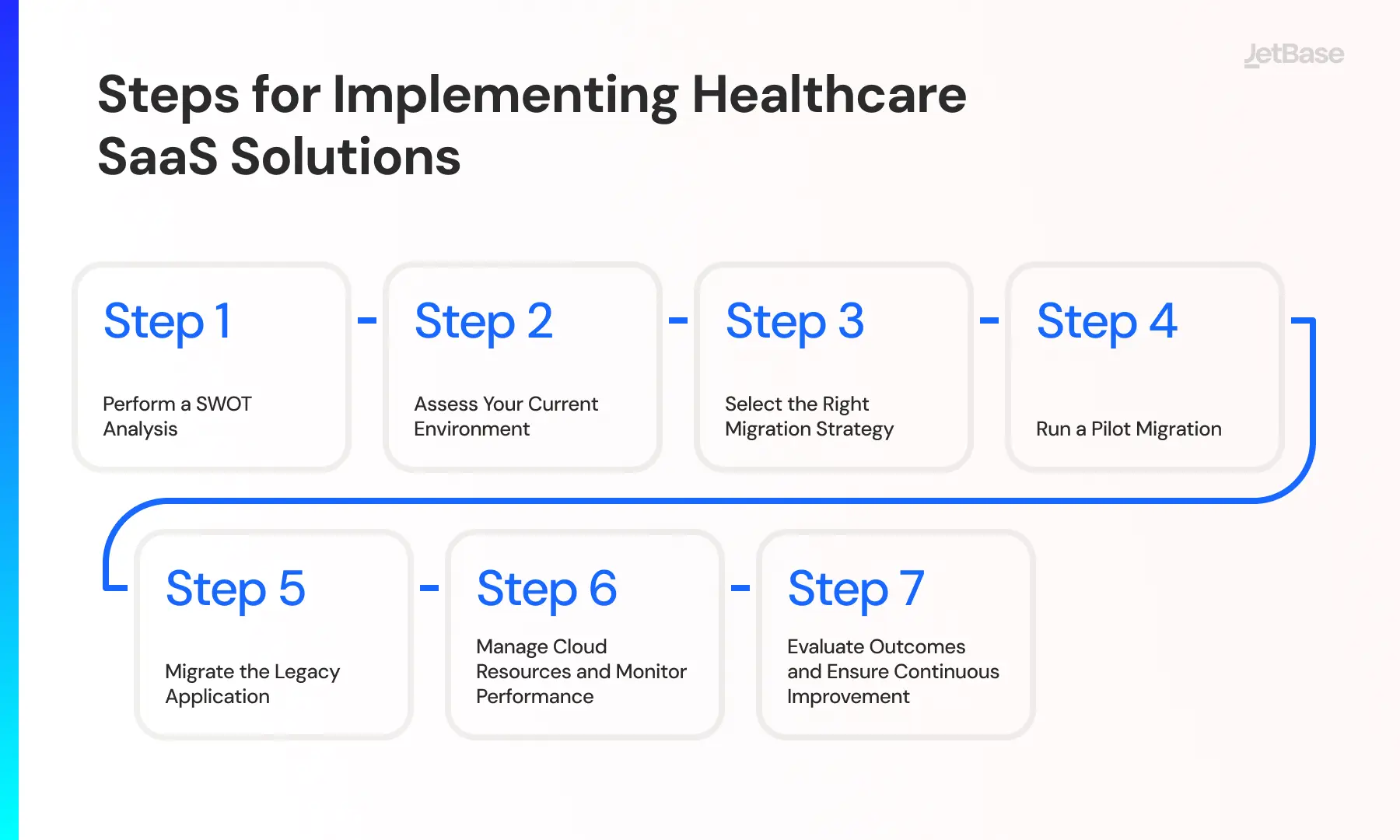
Now that you’ve seen the rather extensive list of benefits, let’s talk about how to actually approach migrating legacy applications. The whole process is best approached in stages, so that’s how we’ll describe it.
Step 1: Perform a SWOT Analysis
An essential step in preparing for migration is conducting an in-depth analysis of your company’s current strengths and weaknesses, potential issues, and ways to improve. This will allow you to set realistic targets for the migration and plan accordingly.
Step 2: Assess Your Current Environment
Next in migrating legacy applications to the cloud, you must understand if the app is fully ready for the move. Here’s what you need for that.
Evaluate the Existing System’s Readiness
Check if you can retool the legacy software to fit the cloud infrastructure and integrate with new technology. Plus, confirm that all relevant data is ready for a transfer and won’t hold you up due to some errors.
Analyze Skill Sets and Resource Gaps
Your in-house team may have skilled engineers. However, that’s no guarantee they’ll excel at migration. Be ready to patch any missing knowledge with external hires or just opt for an outsider team from a reputable vendor. Plus, estimate if you have enough resources for the move.
Step 3: Select the Right Migration Strategy
There are a few ways to go about migrating legacy applications to the cloud, and picking the right one will save you from a major headache down the line. Let’s talk about their pros and cons.
Rehosting, Replatforming, or Refactoring?
Rehosting implies a straight move of an app with no changes, leaving you with all the problems of the legacy app but with the technological advantages of the cloud. Our verdict: Not a great idea.
Replatforming is similar, but you lean into the cloud’s technology a bit more, including cloud-native features. This allows things like faster scaling and IaC, handy and modern choices.
Refactoring involves changing the app to best suit the cloud environment and removing legacy flaws. It takes the most time and money, but it’s also the best overall migration method.
Step 4: Run a Pilot Migration
Before fully migrating legacy applications to the cloud, you can make a controlled mirror of the process to see if you’re truly as prepared as you think. This will allow you to weed out errors and streamline the migration with no real risk.
Step 5: Migrate the Legacy Application
The actual migration process should go fine now that you’ve planned and tested and have a high-skilled team working on it. Whether you go with in-house staff or a vendor like JetBase, this should go just fine.
Step 6: Manage Cloud Resources and Monitor Performance
After you’re done migrating legacy applications to the cloud, closely analyze the resulting performance and set up resource use to take full advantage of it. Be prepared to do some patching to fix any lacking aspects of the app.
Step 7: Evaluate Outcomes and Ensure Continuous Improvement
Once some time has passed, collect the analytical data and use it to build your future plan. Even if the performance is satisfactory, there’s no reason not to try and get more out of your migration by perfecting the app and its integration into your new cloud ecosystem.
![Cloud Software Development [AWS].webp](/static/Cloud_Software_Development_AWS_a351611d38.webp)
Key Considerations for a Successful Legacy Migration
In addition to the steps we outlined for migrating legacy applications to the cloud, you can do a few other things to strengthen your chances of success. For example, you need to have active backups, which give you a second chance if anything goes wrong. Also, pay special attention to how the app users connect to the new environment and whether that connection is reliable.
Plus, once the actual migration is done, do some stress testing to see how well and how fast you can scale. It’s a good idea to do comparative testing to see if you can tweak the setup minimally to perfect the results. Lastly, ensure you have a good pipeline to move users to the new ecosystem with onboarding manuals and no data loss incurred.
Mitigating Risks During the Migration Process
No matter what business process you’re running, it’s always nice to zero out the potential risks, so one as important as migration obviously requires some mitigation efforts. Here are some ideas for keeping the migration risk-free.
Balancing Current and New Versions
Relying heavily on backups allows you to retain older versions and free your team to experiment with new ones. This way, they can try bold optimization tactics that might break things. That won’t be an issue, as you can restore older versions and try again if needed.
Implementing Continuous Integration and Delivery (CI/CD)
We recommend taking the chance to introduce CI/CD when migrating legacy applications to the cloud, as it will help iterate and push updates easily. Establishing this pipeline creates a smooth order of operations that keeps your dev team working at peak efficiency.
Mapping Dependencies and Testing Gradually
Understanding what your success depends on and noting the elements/dependencies that you need to account for are vital for testing. Once you map your dependencies, you can slowly test various elements to determine changes that can be made without adverse consequences to the environment.
Best Practices for Reducing Downtime and Disruption
Perhaps the most straightforward way to minimize downtime is by taking the process in stages, moving parts of the software over without shutting it off completely. This will allow you to essentially clone the app to the cloud while the system runs almost the same as usual.
It’s also a good practice to schedule your migration to low-traffic hours so that if any downtime does occur, it will have a smaller impact on your operations. You can also examine the data before migrating it to structure and compress it, which will speed up the transfer substantially.
Lastly, it may be helpful to set up automated monitoring that will alert you if there is any risk of downtime occurring due to the migration going off the rails. This way, you can address any problems quickly.
To sum up, keeping downtime and disruptions minimal is easier if you:
- Migrate in increments
- Schedule to off hours
- Pre-optimize data for the transfer
- Enable automated monitoring
Ensuring Cloud Security and Compliance
A major advantage of migrating legacy applications to the cloud is accessing modern security, which will allow you to keep all data encrypted. This also makes it easy to establish role-based authorization, gating off sensitive information to keep the business compliant.
Challenges in Legacy Application Migration (and How to Overcome Them)
Any big change in a business can be tricky, and migrating legacy applications to the cloud is certainly no walk in the park. This list of potential issues should help avoid any real trouble, using JetBase’s prior cases for reference.
Managing Costs and Budget Constraints
Migration may not be the cheapest process, but you can fit it into your budget with careful planning and a well-built team. Plus, you can estimate what add-ons you can get during migration without stretching expenses too far.
Addressing Resistance to Change
A major pain point of migrating legacy applications to the cloud is that this one app likely holds up a very important piece of your system. This may leave some employees and investors resistant to moving, but listing out your incoming benefits should do the trick.
Overcoming Organizational Cultural Barriers
You can also hold training sessions and lectures that fully explain the virtues of using modern solutions. This will allow an open conversation that helps the company move forward from grasping outdated tech and prevent software lockouts and security threats.
Filling Skill Gaps and Ensuring Expertise
Changing your infrastructure and working in a new environment may mean you lack the right employee skills to keep things running smoothly. That’s why it’s important to start training early and seek out a migration team to help with onboarding and initial use.
Tackling Downtime and Ensuring Smooth Transitions
In most cases, you won’t be able to avoid downtime during the transition, but it can be minimized by doing the process in parts and keeping the legacy system active. You should also ensure that the move to the new system is fully processed and thoroughly tested.
Best Practices to Simplify Legacy Migration
To guarantee an easier time when migrating legacy applications to the cloud, we suggest using these simple tricks.
Choosing the Right Cloud Provider and Services
Since you’re betting the success of the whole process on the cloud, it makes sense to carefully weigh your options when it comes to providers. The top names are well-known to everyone, giants like AWS, Azure, and GCP. Consider measuring them against each other to see whose services best match your app and its use case.
Leveraging Automation to Streamline Migration
Migrating legacy applications to the cloud involves many smaller processes, such as transferring data, verifying its integrity, and checking connections to APIs. While these can be done manually, there’s no reason not to automate them to save time and money. Leave the more difficult tasks to engineers and let AI-powered automation handle the minutiae.
Migrate Your Application to the Cloud With JetBase
We’ve told you how to migrate legacy applications to the cloud and what benefits this endeavor will bring you. But, in order to make sure the process goes smoothly, it’s best to hire a team of experts, a team like JetBase. With over 10 years on the market and experience in a variety of industries, we are the best pick for your migration needs.
Our team members will use their knowledge of the cloud to ensure the migration never encounters any issues and that you reap its full benefits. We pride ourselves on excellent communication and a focus on clients’ needs, which always leads us to success. So, if it’s a successful migration you seek, send us a message today.