

It’s no secret that AWS microservices are a popular tool for cost optimization and scaling, but they’re not exactly a plug-and-play instrument. Setting up an entire ecosystem that runs smoothly and takes advantage of all the benefits of microservices is no easy task. Today, JetBase will explain how to do it, why it’s worth it, and what challenges you may face along the way.
Why Legacy Systems Are Holding You Back
Undertaking a transformation of your architecture is a daunting task, even with the promise of microservices AWS to change your performance. So let’s first focus on why you need to do it, looking at it from the perspective of those with legacy systems.
The Drawbacks of Monolithic Architectures
Perhaps the most prominent difficulty of working with monolithic architecture is how rigid it is and its lack of built-in scaling possibilities. However, we’ll devote a separate section to this, and here we can address other flaws. For one, you can only use a single tech stack, limiting your ability to experiment and use different frameworks.
Plus, monolithic is not a fitting space to implement continuous integration/continuous delivery, which are important tools for efficiency. Lastly, it makes collaboration more difficult, as your entire team will need to have the same skill set, and working on different parts of the system could lead to conflicts and errors.
| Feature | Monolithic | Microservices |
|---|---|---|
| Tech stack | One across all apps | Can be unique for each service |
| CI/CD | Not a suitable environment | Supported natively through specially-designed AWS services |
| Fault resistance | Reduced as all components rely on each other to keep the system functioning | All components independent, keeping the system running even if one fails |
Scalability and Flexibility Challenges
Unlike AWS microservice architecture, monolithic architecture has the same resources and functions working on all processes, resulting in a very strict performance ceiling. It still allows for some scaling, but it will never outperform a system that divides the load evenly. As a result, monolithic has lost a lot of its popularity, with 74% of companies using microservices.
Introduction to AWS Microservices
Now that we’ve established the flaws of the old system, let’s talk about the promises of the new one. We’ll start with a simple primer on microservices on AWS and what they do.
Understanding Microservices Architecture
Microservices are a collection of small services that operate independently of each other, each focused on its own specific purpose. They can be changed, updated, or replaced easily with no effect on other parts of the ecosystem, allowing companies to keep their operations going even during maintenance. This autonomy is made possible through API connections and works great for large enterprises.
Core Features of AWS Microservices
AWS leads the global cloud infrastructure market with about 39% share, and its microservices offering benefits from the same scale and maturity. They’re also distinguished by their high quality and versatility. This section will aim to highlight those.
Key Characteristics of Microservices on AWS
With Amazon’s boundless resources, microservices on AWS boast top-notch security, using granular permission settings to control access and running authorization through microservices. They’re also renowned for fault tolerance, as downtime for AWS services is very rare. The list of substantial disruptions is shorter across decades than some services have in a year.
AWS also encourages CI/CD integration and promotes it with quick deployment tools, eliminating the need to manage infrastructure. Its sprawling ecosystem, instead, supports deep interconnectivity with minimal effort from the users.
Advantages of Adopting Microservices on AWS
Migration from monolithic architecture to microservices is a well-studied process that comes with certain obstacles to surmount; these lessons apply to microservices AWS too. In order to give you a bit of encouragement for the work ahead, let’s talk about all the benefits your business gets with this transition.
Enhanced Scalability and Flexibility
As each microservice relies on its own resources, you can add as many of them as you want, expanding your processes with no hit to performance. Additionally, if you decide to reorient, each of these can be configured to serve a different purpose without interrupting any other processes.
Reduced Time to Market
Comparing regular architecture and an AWS microservices example, one of the first things that will strike you is how efficient development is with the latter. Being able to quickly iterate, produce updates, and deploy them results in faster releases. So if you have a novel feature and want it to launch before competitors get the chance to do the same, microservices will help.
Cost Efficiency with Pay-As-You-Go Models
Instead of committing to a subscription with steep rates, where the expenses remain the same regardless of usage, AWS microservices offers an alternative model. You can instead opt to pay only for the resources you end up using each month. Thus, you’d be scaling your expenses appropriately with your business growth, never spending more than necessary.
Better Fault Isolation and Resilience
Another major difference between monolithic and microservices on AWS is the fact that one part of the system failing means absolutely nothing to the rest of your infrastructure. Your team can easily do maintenance on a service or replace it completely without other processes being affected at all. As a result, your ecosystem is much less likely to experience downtime.
Which AWS Services Power Microservices?
Microservices on AWS have plenty of variety, and we want to point out the core ones that will be relevant to most businesses:
- Lambda;
- ECS/EKS;
- SQS/SNS;
- API Gateway;
- RDS/DynamoDB.
Without further ado, let’s dive right in.
AWS Lambda
One of the most well-known AWS microservices choices, Lambda is an event-driven service, ideal for executing code in response to API requests, user actions, and timer-based processes. It’s serverless, requiring no effort from you to scale its operations or run the code you upload.
Amazon ECS and EKS
Both of these essentially help you build and control containers, although EKS is specifically for Kubernetes clusters. Keeping your apps containerized is great for privacy and security purposes, as well as simple load balancing through resource assignments. Both rely on EC2 instances or a serverless Fargate service to function, with both options quite good. However, Fargate is certainly easier to manage overall while EC2 is best for those who seek total control.
Amazon SQS & SNS
AWS microservices can be used to send notifications to subscribers in a multi-channel stream with the help of Simple Notification Service or SNS. It’s supplemented by Simple Queue Service or SQS, which allows admins to schedule messages, either for delivery to users or for inter-system communication.
AWS API Gateway
This service is explained pretty thoroughly by its name, serving as a management suite for APIs in your ecosystem. It helps keep calls secure, queue requests as needed, and connect client apps and your backend infrastructure. API Gateway also automates load balancing to ensure your services are never slowed down by overwhelming traffic.
Amazon RDS & DynamoDB
RDS is quite sprawling as far as AWS microservices go, automating database backups, replication, and scaling. It fully takes care of database management, allowing you to focus on other tasks. Those who want their database to be NoSQL and traffic-resistant can instead use DynamoDB, which autoscales as well and has a focus on low latency, ensuring stable performance.
| Service | Purpose |
|---|---|
| Lambda | Serverless code execution based on events and API requests. |
| ECS/EKS | Container creation to keep apps independent and private, securing data from unwarranted access. |
| SQS/SNS | Notification sending, message queuing, inter-system communication. |
| API Gateway | Connectivity with security features and automated load balancing. |
| RDS/DynamoDB | Backup automation, replication, and scaling. Latency lowering functionality. |
Typical Microservices Architecture on AWS
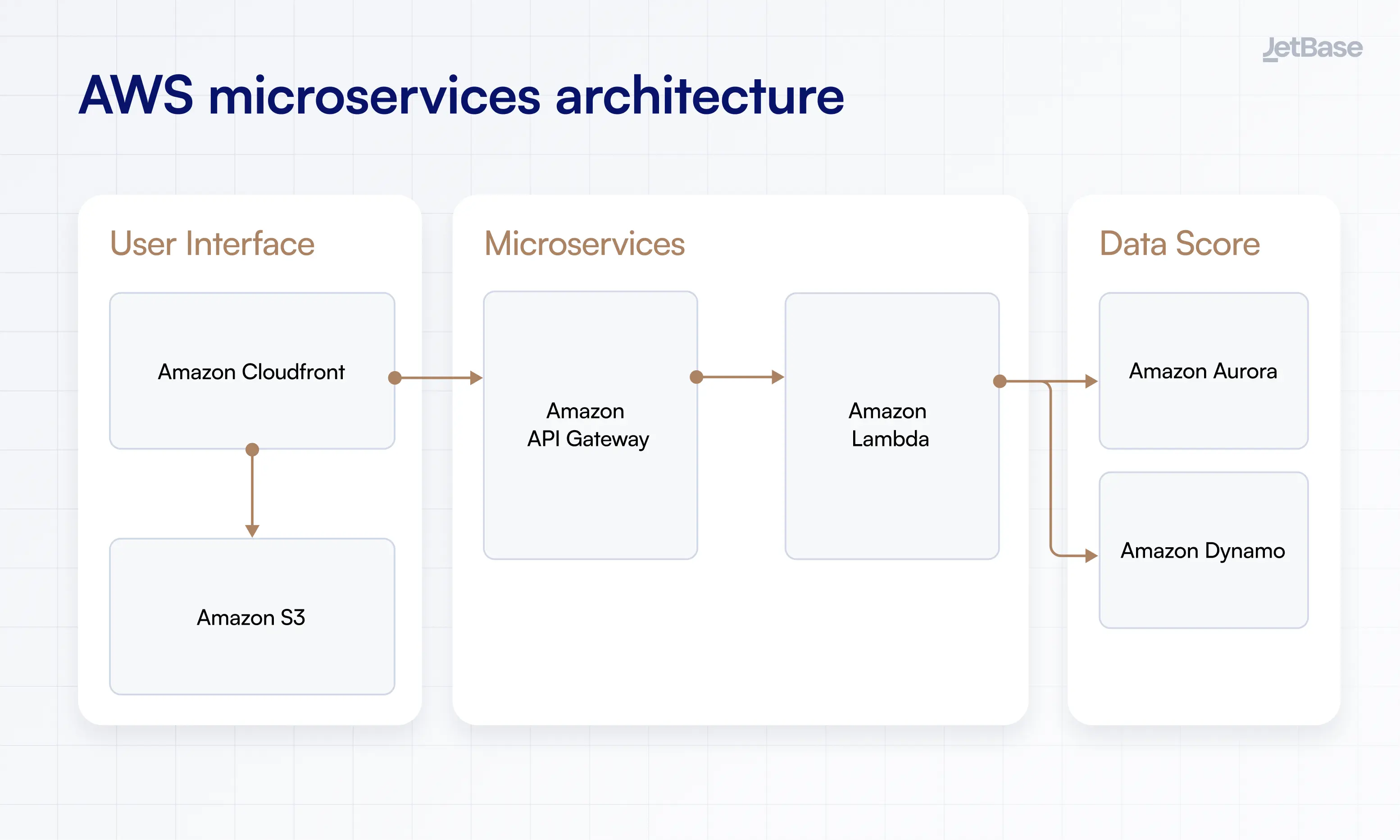
We’d like to show how microservices actually fit into a business ecosystem, including descriptions of its core layers and an AWS microservices architecture diagram.
User Interface Layer
The AWS microservices layer through which your users will be interacting with applications and services, which can include both the visual interface and any connected devices. Content here is managed through Cloudfront as a Content Delivery Network (CDN), offering secure, low-latency transferring. It also uses S3 for object storage.
Microservices Layer
The actual layer of microservices on AWS has the containerized services running your operations, using things like Lambda and Docker. The former executes code and scales it as needed, while Docker keeps processes independent and secure from one another.
Data Layer and Storage
Here, you will store data necessary to operate your apps, caching it in-memory to reduce the load on your database. You’ll also need object storage (such as S3 we mentioned earlier) and a full-fledged database service like DynamoDB to store data beyond the cache. This allows you to be more flexible with storage with no penalty to performance.
Lastly, take a look at this AWS microservices architecture diagram to get a visual idea of how things work.
How to Build Microservices Using AWS
With the layers out of the way, let’s zoom in and talk about establishing the right base for your microservices. This is about making the AWS environment optimized for your needs and avoiding possible gaps in connectivity.
Initial Setup and Planning
Begin your journey into AWS microservices by mapping out the services you want to use and setting up the necessary AWS infrastructure. This can mean creating enough instances, configuring Kubernetes or ECS, and establishing containerized spaces for your apps. Don’t go all in at once, focus on establishing only the necessary microservices at first.
Communication Between Microservices
There are three core types of communication to choose from:
- Synchronous;
- Asynchronous;
- Hybrid.
Selecting and Configuring the Right Database
Your choice of database will be split between three options: SQL, NoSQL, and NewSQL. However, odds are that whatever kind you’ve been running before this will be the optimal choice moving forward, if only because switching can be time-consuming and complicated. Additionally, look for databases that offer high performance and low latency.
When configuring, choose whether you want to assign a single database to the entire environment or opt for the more complex model of one database per service. This allows them to be independent and respond quicker to any requests they receive.
Setting Up AWS DevOps Tools
DevOps can enhance the benefits you get from AWS microservices, and all it really requires is the adoption of relevant AWS tools like CodePipeline, CloudFormation, or Systems Manager. Once you’ve assembled your instruments, establish version control to navigate changes and revert when necessary easily. You’ll also need to monitor changes through CloudWatch, compiling data and visualizing it.
Challenges in Implementing Microservices and How AWS Addresses Them
Granted, not everything about microservice architecture is going to be smooth and easy. But if you use AWS, you can certainly make the process a bit more reliable to navigate. Here’s how.
Managing Complex Service Interactions
If your intention is to have a system with complex interconnectivity where processes may need to communicate in unpredictable and unique ways, you will need AWS’s asynchronous protocols. These will allow services to react and perform their function even if part of the ecosystem hasn’t activated yet or isn’t engaged in the task at all, eschewing traditional logic. EventBridge will help with this, keeping everything connected without compromising the services’ independence.
Ensuring Security and Data Integrity
One of the main reasons to host your microservices on AWS is that it offers extensive security protections and automated monitoring tools. As a result, your data will always be encrypted and secured via multi-stage authorization and access management protocols. This is essential for any business as data leaks could be massively disruptive and costly.
Handling Distributed System Failures
Those on AWS are recommended to enable request throttling, which helps avoid network disruptions in high-traffic times, as well as limit retry calls for the same reason. It’s also best to limit queueing in such scenarios to avoid prolonging the high-stress periods. Plus, take advantage of AWS’s automated backups and resource scaling, letting the system work out any excess load itself.
Best Practices for Implementing Microservices on AWS
In addition to overcoming challenges, here are some tips on generally working with AWS that will result in a stronger environment that’s better suited to your operations.
Planning Your Microservices Architecture
You will likely have a rather high number of microservices on AWS, requiring extensive planning to keep them all connected. Have your team draw up designs for the architecture in advance, discussing what DBs to choose and how to process user requests. Most of all, you need to ensure you’re using AWS functionality to create reliable backups and manage data.
Ensuring Efficient Service Discovery and Communication
Use Amazon’s ECS to route namespaces through the Cloud Map API, automating service discovery and categorizing services via separate names. This way, it will be easier to establish communication in batches with all services in the “BusinessBackend” category, for example. Cloud Map will also do health checks to ensure all services are up and running.
Using Containers and Serverless for Microservices
Going serverless frees you from the need to manage servers, and AWS is happy to support that with services like Lambda, which rely on this model. Meanwhile, containers for AWS microservices will keep them functioning independently and, using categories, communicating at scale with no latency or manual interference.
Scaling Microservices Based on Demand
Most cases of scaling microservices on AWS will be automated thanks to service features that control load balancing and resource scaling, but you can also engage in horizontal scaling if needed. This just involves adding more instances of a particular microservice when necessary, letting AWS further distribute user loads during peak times.
| Practice | Result |
|---|---|
| Pre-planning architecture | Ability to have an intricate ecosystem with no errors or latency issues |
| Strengthening discovery and communication | Easy control of microservices with group-based communication |
| Using containers and serverless services | Keeping apps independent and avoiding extra work related to server management |
| Establishing scaling | Accommodating any amount of traffic even during peak load times |
Why AWS is the Ideal Platform for Microservices
We’ve been talking up AWS microservices with an up-close look, but let’s zoom out for a change and talk about what makes AWS the prime real estate for this architecture. For one, like we pointed out above, it has an absolute wealth of services that fit this purpose. With Lambda, EC2, ECS/EKS, and others, you can create a sprawling, resilient network of microservices running for your business.
Next, AWS focuses on automating a lot of the typical management tasks, particularly scaling. This is great as it allows your environment to keep rising with minimal input, sustaining any amount of traffic. The same goes for security, as AWS provides some serious encryption and access management, doing the bulk of the work for you. Couple that with broad monitoring tools, and you have an ecosystem that’s tailor-made for microservices and businesses aiming to grow.
Need Help with Implementing Microservices on AWS?
This ends our guide to AWS microservices, but that doesn’t mean our ability to support businesses moving to microservice architecture ends with it. We’ve shown you just how intricate a microservice setup can be and the challenges associated with these services. So now, you will need some technical expertise to run the process correctly and avoid any issues.
JetBase is ready to be your reliable partner in this task, with our decade-plus of experience in crafting custom solutions with flexible, resilient architecture. We’ve used AWS for cybersecurity and energy solutions, software for the medical industry, and video interviewing. This wealth of expertise is our pride, along with our tight-knit team that makes communication and quality their two priorities.
So if you’re ready for a free tech audit and top-notch development, send us a message.